Flip GIF - Mirror It Horizontally or Vertically
Mirror a GIF left to right or top to bottom with one tap, and watch it play while you do. Nothing is uploaded.
 Download GIF
This tool flips a GIF in your browser. Flip horizontal mirrors it left to right, Flip vertical mirrors it top to bottom, and the GIF keeps playing so you see the mirror image before you download it. The file itself is mirrored and no frame is drawn again, so the flipped GIF is as sharp as the one you started with.
How do I flip a GIF?
- Select GIF. Click the button or drop the file on the box. It opens on a stage and starts to play.
- Tap Flip horizontal or Flip vertical. The mirror shows at once and the button stays lit. Tap it again to take the mirror off.
- Download GIF. The button wakes up as soon as a mirror is on. Start over clears both.
What is the difference between a horizontal and a vertical flip?
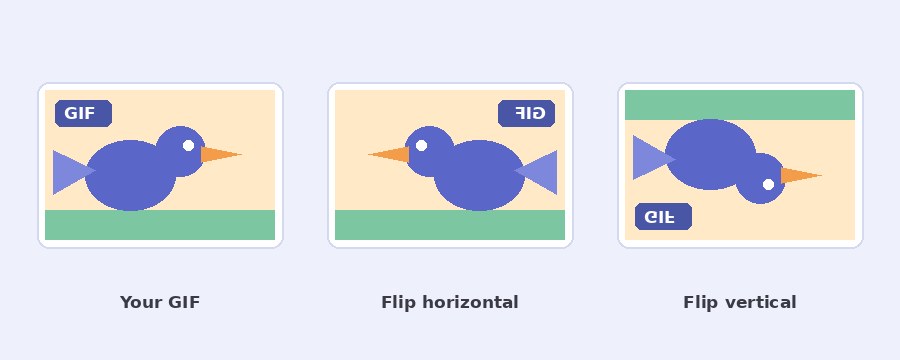
Flip horizontal is what a wall mirror does. Left becomes right, so a person looking left now looks right, and the GIF stays the right way up. This is the one most people want: a front camera clip with back to front writing, a character that should face the other way, or a product shot that has to point into the page instead of out of it.
Flip vertical is what a lake does to a mountain. Top becomes bottom and the GIF ends up on its head, with left and right where they were. It is used for reflection effects and for clips recorded through a mirror or a lens that turned the picture over.
Does flipping a GIF lower the quality?
No. A mirror only moves pixels to the other side, and every pixel still lands on the grid. So the tool mirrors the file you gave it and draws nothing again. The colours, the number of frames, the time each frame shows and the size in pixels are exactly what they were, whatever the size of the GIF. The line in the download box says so.
A video is the one case that is drawn fresh, because it has to become a GIF first. If the flipped file is too heavy for where it is going, the GIF compressor brings it down.
Flip, rotate or reverse: which one do I need?
The three get mixed up all the time. A flip is a mirror image, and that is this page. A rotation turns the picture around its middle, which is what a clip filmed with the phone on its side needs, and the rotate GIF page does that. Reversing means playing the frames backwards in time, which is a different job and not something a flip can do.
One flip has a side effect worth knowing: writing comes out back to front. When the words matter, flip first and then put new words on with the text on GIF tool.
Your GIF is flipped on your device
Nothing is uploaded. The page opens the file, mirrors it and hands it back, all inside your own browser. No server sees your GIF, there is no account and no watermark. The page downloads its own code and sends nothing back, and closing the tab leaves nothing behind.
Frequently Asked Questions
Will writing in the GIF read backwards?
After Flip horizontal, yes. A mirror swaps left and right, so letters, numbers and logos come out back to front. If the writing matters, flip the GIF first and add fresh words afterwards.
Does flipping change the speed or the number of frames?
No. Every frame is mirrored where it stands. The frame count, the time each frame shows and the way the GIF loops all stay as they were.
Can I flip it both ways at once?
Yes. Tap both buttons and both stay lit. A GIF mirrored both ways looks the same as one turned upside down by a half turn.
Can I flip a video?
Yes. Drop an MP4 or WebM in the box and it is read at 10 frames a second, at up to 640 pixels on the longer side. The mirrored result is written as a GIF.