Discord Sticker Maker
Turn a GIF, picture or short clip into a 320 x 320 sticker under 512 KB, and see how Discord will show it. Nothing is uploaded.
 Download GIF
This tool makes a Discord sticker out of any GIF, picture or short clip, in your browser: it frames the picture in a 320 by 320 square, keeps the part you pick to 5 seconds, and squeezes the file under Discord's 512 KB limit before you download it. A mock of the chat shows the sticker at the size Discord really draws it, so what you upload is what your server will see.
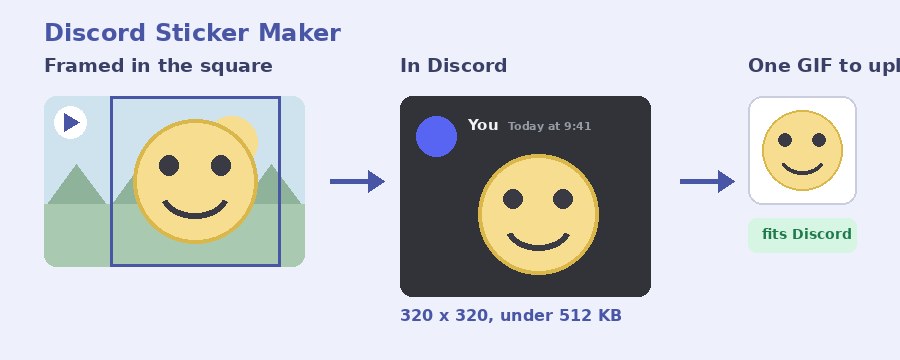
How do I make a Discord sticker?
- Select GIF or picture. Click the box or drop the file on it: a GIF, a PNG, JPG or WebP, or a short MP4 or WebM.
- Frame it. Fill the square crops the picture to a square: drag it inside the square to choose what shows, and Zoom pulls in closer. Show it whole keeps everything, with see-through space around a picture that is not square.
- Pick the part that plays. For a GIF or a clip, move the two thumbs to the part you want, up to 5 seconds. Frames a second trades smoothness for a smaller file; 15 suits most stickers.
- Make sticker. The file is written, measured and, if it comes out over 512 KB, squeezed until it fits. The popup then shows the size next to the limit. Rename it if you like and press Download GIF.
- Upload it in Discord. Server Settings, Stickers, Upload Sticker, choose the file, give it a name and a related emoji.
What size does a Discord sticker have to be?
Discord's own rules for a server sticker, from its developer documentation: the file must be a PNG, APNG or GIF (Lottie files are only for verified and partnered servers), it must be 320 by 320 pixels, it can be no bigger than 512 KB, and an animated sticker is limited to 5 seconds. Every sticker this page makes meets all four, which is the whole point of it: the size is fixed, the part you pick cannot pass 5 seconds, and the file is squeezed under 512 KB before you see it.
The limit is 512 KiB to be exact, which is 524,288 bytes. The popup measures the finished file against that number, not a rounded one.
How does it keep the file under 512 KB?
A 320 by 320 GIF that runs for 5 seconds at 15 frames a second has 75 frames, and busy footage can push that well past the limit. When that happens the tool does what the Discord GIF compressor does, in steps: gentle lossy compression first, then fewer colours, each pass measured against the limit, and only if the last step is still too big does it halve the frame rate and go again. The gentlest setting that fits is the one you get.
If you want more say, the two things that shrink a sticker most are a shorter part and fewer frames a second. Two seconds of a loop at 10 frames a second is a small file with room to spare, and stickers are short by nature.
GIF or PNG for a Discord sticker?
This page always gives you a GIF, which Discord accepts for stickers still or animated. A GIF holds 256 colours per frame, which at 320 pixels is more than enough for a drawing, a face or a reaction clip. If your sticker is a flat drawing with a see-through background, the background stays see-through, so it sits on the chat the way Discord's own stickers do.
A still picture comes out as a one-frame GIF. Discord treats it as a normal sticker.
How does the sticker look in Discord?
Smaller than you think. In chat Discord draws a sticker at 160 pixels, half the file's size, and on a phone smaller still. The dark chat under the preview shows your sticker at exactly that size. If a detail is hard to make out there, it will be hard to make out in the server: fill the square with the subject, zoom in, and leave the small print out.
Your sticker is made on your device
Nothing is uploaded. The file is opened, framed, written and squeezed by the page itself, on your own device. No picture of yours is sent anywhere until you upload the finished sticker to Discord yourself, and closing the tab leaves nothing behind. It is free, with no account and no watermark. For an emoji rather than a sticker, which has its own size and limit, use the Discord emoji maker; to shrink a GIF you already have, the 256 KB GIF compressor aims at a size directly.
Frequently Asked Questions
Do I need Nitro to upload a sticker?
No. Uploading a sticker to a server needs the Manage Expressions permission in that server, not Nitro. A server starts with a handful of sticker slots and boosting adds more. Nitro matters for using stickers across servers, not for making them.
Can I make a sticker from a video?
Yes. Drop an MP4 or WebM in the box and it is read at 10 frames a second. Pick the part with the two thumbs, up to 5 seconds, and it comes out as an animated GIF sticker.
Why is my sticker limited to 5 seconds?
Discord itself plays animated stickers for up to 5 seconds, so a longer loop would be cut off on upload. The slider here cannot pick more than 5 seconds for that reason.
Can the background be see-through?
Yes. A GIF or PNG with see-through parts keeps them, and Show it whole puts see-through space around a picture that is not square. Keep transparent background is ticked for you whenever that applies.