Discord Emoji Maker
Turn a GIF, picture or short clip into a 128 x 128 emoji under 256 KB, and see how Discord will show it. Nothing is uploaded.
 Download GIF
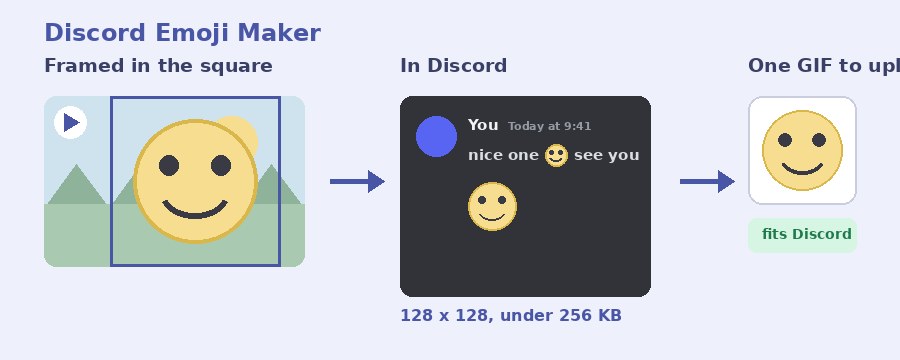
This tool makes a Discord emoji out of any GIF, picture or short clip, in your browser: it frames the picture in a 128 by 128 square and squeezes the file under Discord's 256 KB limit before you download it. A mock of the chat shows the emoji at the two sizes Discord really draws it, in a line of text and on its own, so you know it reads before you upload it.
How do I make a Discord emoji?
- Select GIF or picture. Click the box or drop the file on it: a GIF, a PNG, JPG or WebP, or a short MP4 or WebM.
- Frame it. Fill the square crops the picture to a square: drag it inside the square to choose what shows, and Zoom pulls in closer. Show it whole keeps everything, with see-through space around a picture that is not square.
- Pick the part that plays. For a GIF or a clip, move the two thumbs to a second or two of it. Frames a second trades smoothness for a smaller file.
- Make emoji. The file is written, measured and, if it comes out over 256 KB, squeezed until it fits. The popup then shows the size next to the limit. Rename it if you like and press Download GIF.
- Upload it in Discord. Server Settings, Emoji, Upload Emoji, choose the file and give it a name.
What size does a Discord emoji have to be?
Discord's own rules for a custom emoji, from its developer documentation: the file can be a JPEG, PNG, GIF, WebP or AVIF, the image is 128 by 128 pixels, and still and animated emoji alike can be no bigger than 256 KB. Every emoji this page makes is a 128 by 128 GIF under that limit, which is the whole point of it. The limit is 256 KiB to be exact, 262,144 bytes, and the popup measures the finished file against that number.
Why is an emoji so much smaller than it looks?
Discord draws a custom emoji at about 22 pixels tall inside a message, and at 48 pixels when a message is nothing but emoji. That is far smaller than the 128 pixel file, so fine detail, thin lines and small text vanish. The dark chat under the preview shows your emoji at both sizes: if the face or the object is not clear there, fill the square with it and zoom in until it is. One bold shape reads; a whole scene does not.
How does it keep the file under 256 KB?
At 128 pixels most GIFs fit with room to spare, but a long or busy loop can still pass 256 KB. When it does, the tool does what the Discord GIF compressor does, in steps: gentle lossy compression first, then fewer colours, each pass measured against the limit, and only if the last step is still too big does it halve the frame rate and go again. The gentlest setting that fits is the one you get. A shorter part and fewer frames a second are the two things that shrink an emoji most, and a one or two second loop is all an emoji needs.
Animated or still?
Both come out as a GIF, which Discord accepts for emoji. A still picture becomes a one-frame GIF and behaves like any static emoji; a GIF or a clip becomes an animated emoji. A drawing with a see-through background keeps it, so the emoji sits on the chat the way Discord's own do.
Your emoji is made on your device
Nothing is uploaded. The file is opened, framed, written and squeezed by the page itself, on your own device. No picture of yours is sent anywhere until you upload the finished emoji to Discord yourself, and closing the tab leaves nothing behind. It is free, with no account and no watermark. For a sticker rather than an emoji, which is bigger and has its own limits, use the Discord sticker maker; to shrink a GIF you already have, the 256 KB GIF compressor aims at the size directly.
Frequently Asked Questions
Do I need Nitro to upload an emoji?
No. Adding an emoji to a server needs the Manage Expressions permission in that server, not Nitro. A server starts with 50 slots for still emoji and 50 for animated ones, and boosting adds more.
Why does Discord reject my emoji?
Nearly always the file size: the limit is 256 KB, and a GIF that looks small on screen can be far bigger than that. Everything this page makes is squeezed under 256 KB before you download it, so the upload goes through.
Can I make an emoji from a video?
Yes. Drop an MP4 or WebM in the box, pick a second or two with the two thumbs, and it comes out as an animated GIF emoji. Short loops look best at emoji size and keep the file small.
Can the background be see-through?
Yes. A GIF or PNG with see-through parts keeps them, and Show it whole puts see-through space around a picture that is not square. Keep transparent background is ticked for you whenever that applies.