Combine GIFs - Merge GIFs Side by Side or in Order
Add your GIFs, put them in order, pick a layout and download one GIF. Nothing is uploaded.
 Download GIF
Add Blank Space
Add Text On Frame
Remove Frames
Edit Frames
 Crop
Crop Frame
 Flip
Flip Horizontal
 Flip
Flip Vertical
 Rotate
 Frame
 Trim
Trim Frames
Add Animation on Frame
Starting Animation
For example:- Add a three second fade-in animation at the start of the video.
Animation at the End
For example:- Add a three second fade-out animation at the end of the video.
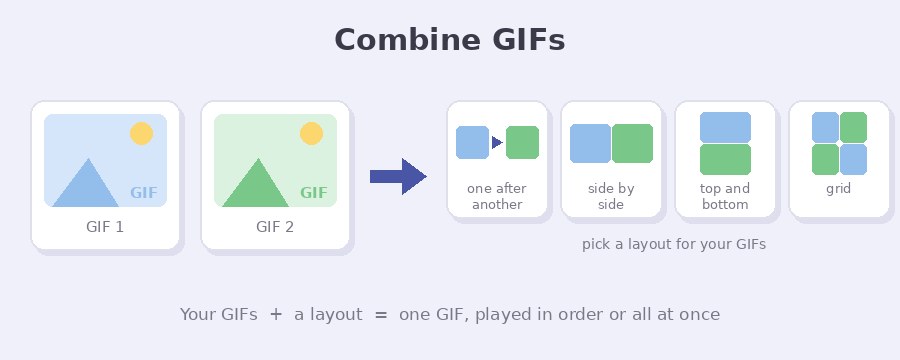
This tool joins two or more GIFs into one GIF, right in your browser. Play them one after another, or side by side, top and bottom or in a grid so they all move at the same time, then download the result with no watermark. Photos and short videos can go in the same GIF.
How do I combine GIFs into one?
- Select GIFs. Click the button or drag your files onto the box. GIFs, photos and videos all work. Use Add GIFs to bring in more later.
- Put them in order. Drag a card by its picture or by the dotted handle, or use the up and down arrows. The number on each card is its place in the GIF.
- Pick a layout. One after another, Side by side, Top and bottom, or Grid once you have four files. The preview plays the real result while you choose, so you see the size, the length and the frame count before you make anything.
- Combine GIFs. A popup shows the progress, then your GIF. Rename the file if you want and press Download GIF.
One after another or all at the same time?
One after another plays the first card to the end, then the second, and so on. Use it to join clips into one longer GIF. The combined length is every card added together, and the first card sets the size, so move a different card to the top to change it.
Side by side, Top and bottom and Grid put everything into one picture and play it together. They suit before and after comparisons, two reactions next to each other, or a sheet of stickers shown at once. Grid appears once you add four files, and you can leave the columns on Auto or set 2, 3 or 4 yourself.
What happens when the GIFs are different lengths?
When they play together, the result is as long as the longest GIF, and shorter ones repeat until it ends. A 1 second GIF next to a 3 second GIF plays three times. A photo stays on screen the whole time.
Each GIF also keeps its own speed. The combined GIF gets a new frame every time any of them changes, so it can end up with more frames than any single one. In one test here, a 4 frame, 1 second flag GIF placed beside a 25 frame, 16.3 second space GIF made a combined GIF of 84 frames at 522 x 183 pixels.
What happens when the GIFs are different sizes?
Nothing is stretched. For Side by side, every card is shown at the height of the shortest one. For Top and bottom, every card takes the width of the narrowest. In a Grid, each card gets an equal box as tall as the shortest card and shaped like most of the set, so one odd shape does not leave the rest tiny. One after another uses the size of the first card and fits the others inside it.
A GIF wider or taller than 1600 pixels is brought down to 1600 pixels as soon as you add it, which also keeps big files from filling your memory. Use Space between to leave a gap, and tick Keep transparent background to make that gap, and any space around a card, see-through instead of white. That box shows up whenever some background would be visible, and it starts ticked when a picture already has see-through parts.
Can I combine a video with a GIF?
Yes. MP4 and WebM files work, and MOV where your browser can play it. The page takes 10 frames from every second of the video, up to 1000 frames, which is 100 seconds of video. Frames are kept at most 640 pixels on the longest side, and smaller when there are a lot of them, so a long clip does not fill your memory. A 100 second video read here gave 1000 frames of 432 x 243 in about 16 seconds. After that the video is just another card, so you can reorder it, edit it and combine it with your GIFs.
Edit, caption or add an effect first
Each card has a gear button. Edit crops, flips or rotates it and can remove frames you do not want. Write text puts a caption on it and can add blank space above or below. Add effect gives it a fade, a zoom or a slide. The editor loads the first time you open one of these, and the combined GIF uses every card as it looks after your changes.
Starting from a longer video? The video to GIF converter gives you control over the part you keep. To hit a set size in KB or MB, run the result through the GIF compressor. To lay a GIF over a picture instead of beside it, use add GIF to photo, and to caption the result there is text on GIF.
How do I keep the combined GIF small?
A combined GIF holds every card inside it, so a wide row of large GIFs adds up fast. Top and bottom or a Grid usually gives a smaller picture than a long row, and a smaller Space between helps too.
Once the GIF is made, press Make it smaller in the download popup. It is deliberately gentle, so the picture keeps its quality, and on a big GIF it works on 2 or 3 cores at once to keep the wait short. The 84 frame test GIF above came out at 1.9 MB, and the smaller copy was 1.2 MB, which is 37 percent less. For a much smaller file, run it through the GIF compressor, where you choose how hard to squeeze.
Your GIFs stay on your device
Nothing is uploaded. Your files are opened, lined up and joined by the page itself, on your own device, and the finished GIF is made there too. The one outside request the tool makes is for the list of caption fonts, and only if you open Write text. Close the tab and nothing is kept anywhere.
Frequently Asked Questions
How many GIFs can I combine?
There is no set limit. Everything runs on your device, so the real limit is its memory. A GIF wider or taller than 1600 pixels is brought down to 1600 pixels when you add it, and the finished GIF is kept to 1600 pixels on its longer side, so a long row of GIFs is scaled to fit.
Can I combine GIFs on my phone?
Yes. The page works in the phone browser, and Select GIFs opens your files, photos and videos. Big files take longer on a phone because all the work happens on the phone itself.
Why does the combined GIF have more frames than my GIFs?
When GIFs play at the same time, the result needs a new frame every time any one of them changes. A GIF that changes every 0.1 seconds next to one that changes every 0.15 seconds gives more frames than either, and that is what keeps both at their own speed.
Can I put a photo between two GIFs?
Yes. Add the photo like any other file and drag its card into place. In One after another the card gets a small box for how long the photo shows, which starts at 2 seconds. In the layouts that play together, a photo simply stays on screen the whole time.