Add GIF to Photo
Put an animated GIF on your picture, move it where you want and download one GIF. Nothing is uploaded.
 Download GIF
This tool puts an animated GIF on your photo and gives you back one GIF, made in your browser. Drag the GIF wherever you want it on the picture, or keep the picture whole and set the two in a row or a column, or play them one by one. There is no watermark and no sign-up.
How do I add a GIF to a photo?
- Select photo. Click the first box or drop your picture on it. A GIF or a short video works here too, and the editor opens once the second box is filled.
- Select GIF. The second box takes the GIF you want on the picture.
- Put it where you want it. Drag the GIF on the picture, pull a corner to resize it and use the round handle under it to turn it. The preview plays as you go, so what you see is what you get.
- Add GIF to Photo. A popup shows the progress, then your GIF. Rename the file and press Download GIF.
On the photo, in a row, in a column or one by one?
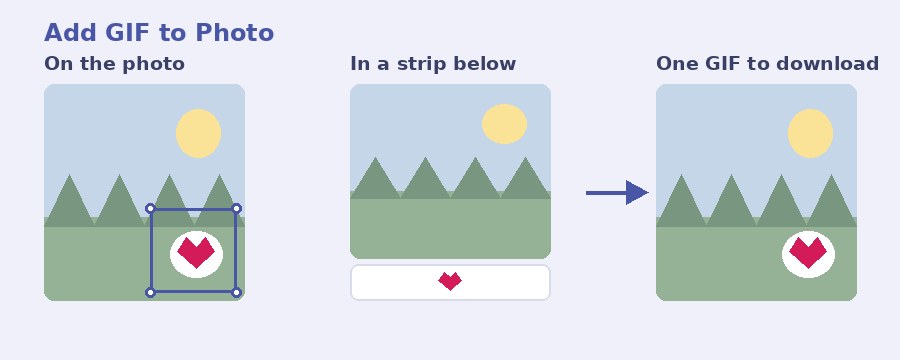
On the photo puts the GIF over the picture, which is what most people want: a sticker in a corner, a reaction near a face, a logo in the bottom right. The rows in the list are the stacking order, and the bottom row is the picture the others sit on, so moving a GIF to the bottom makes it the background and puts the photo on top of it.
In a row and In a column leave the picture untouched and give each GIF a strip of its own next to it, so nothing is hidden. The result grows to make room. A 1200 by 1600 photo with a flag GIF in a strip underneath came out 803 by 1600, because the whole thing is kept inside 1600 pixels. The list of layers is the order they sit in: move a row above the photo and its GIF goes on top, or on the left in a row. You set how big each strip is and what colour it is, and the photo's row works the same way, so its strip can be sized too.
One by one plays them in turn instead. Each GIF has the whole frame to itself for as long as it runs, and the photo shows for the seconds set on its row. Move the rows to change the order, the photo included.
Does a see-through GIF stay see-through?
Yes. A GIF with see-through parts keeps them on the photo, so a sticker with no background sits straight on the picture. Keep transparent background shows up when any background would be visible in the result, which is worth ticking when a strip or an empty edge would otherwise come out white.
What size is the finished GIF?
The photo sets the size. A 1200 by 1600 picture gives a 1200 by 1600 GIF, and a strip adds to that. Anything wider or taller than 1600 pixels is brought down to 1600 when you add it, which keeps the GIF quick to make and easy to send.
Shape gives the finished GIF a square, 4:5 post, 9:16 story or 16:9 wide frame, whichever way the pictures go together: on the photo the picture is reshaped, and in a row, a column or one by one the whole set is fitted into the frame. If it does not fit decides whether everything is shown with space around it or fills the frame with the edges cropped. The line under the preview always says the real size, length and frame count before you make anything.
Can I use a video, or more than one GIF?
Both. MP4 and WebM files work, and MOV where your browser can play it. A video is read at 10 frames a second, up to 1000 frames, which is 100 seconds. Drop one in either box: as the picture underneath, or as the moving part on top.
The Add button in the Layers list brings in as many layers as you want, and each is separate. Pick one in the list to move it, fade it, or change the Speed of this GIF without touching the others. The result runs as long as the slowest layer, and every layer keeps its own timing.
How big is the file, and can I make it smaller?
A GIF holds every frame as a picture, so a tall photo with a four frame GIF on it is around half a megabyte. In one test here, a 1200 by 1600 photo with a 4 frame flag GIF came out at 475 KB.
The download popup has a Make it smaller button that is deliberately gentle, so the picture keeps its quality: the same test GIF came back at 188 KB. For a set size in KB or MB, put the result through the GIF compressor, where you choose how hard to squeeze. To put two GIFs side by side instead of one on top of the other, use combine GIFs, and for words rather than a sticker there is the GIF caption maker.
Your photo stays on your device
Nothing is uploaded. Your photo and your GIF are read, placed and joined by the page itself, on your own device, and the finished GIF is made there too. No picture of yours is sent anywhere, and closing the tab leaves nothing behind.
Frequently Asked Questions
Does the GIF still move on the photo?
Yes. The result is a GIF, not a still picture, so it plays wherever GIFs play: WhatsApp, Discord, Slack, a web page. The photo underneath stays still and the GIF on it keeps its own speed.
Can I put more than one GIF on a photo?
Yes. The Add button in the Layers list brings in as many as you like, and each one is a layer you can move, resize and speed up on its own. They play together and the GIF is as long as the slowest of them, or one after another if you choose One by one.
Can I add a GIF to a photo on my phone?
Yes. The page works in the phone browser. Drag the GIF with one finger, pull a corner to resize it, and the picture stays at the top of the screen while you change the settings under it.
What happens to a very large photo?
A picture wider or taller than 1600 pixels is brought down to 1600 pixels when you add it, and the finished GIF is kept to 1600 pixels on its longer side. GIF is an old format, and a huge one is slow to make and slow to send.